

Article by
Chris Niblett
With over 28 years of experience in IT and pre-sales roles, my transition into the hospitality and retail sectors has enabled me to help businesses of all sizes optimise their electronic payments and EPOS systems. My passion for service-driven solutions led me to create PenguinPay, where I provide tailored solutions that drive business success.
Payment processes shape how clearly you can see and manage cash flow. To streamline business payments, connect the way you accept payments with how transactions are recorded and reconciled. This makes it easier to track what has been paid and spot manual steps slowing the process. For UK hospitality and retail businesses, the right approach depends on how customers pay at tills, tables and online.
It’s easy to focus on the sale itself, but what happens after payment matters too. This article explains how streamlined payment processing can affect cash flow and what hospitality and retail businesses need from their payment set-up. It also covers how payment methods and integrated systems can support a smoother customer experience and a clearer view of daily transactions.
Key Takeaways
- Connect payment records with accounting workflows to reduce manual reconciliation and get a clearer view of transactions.
- Consider how payment methods and processing times affect the timing and visibility of money coming into your business.
- Match payment options to the realities of your hospitality or retail operation, from counter service to online sales.
- Explore integrated EPOS and payment solutions when disconnected systems make everyday transactions harder to manage.
1. Why does streamlining your payment processing matter?
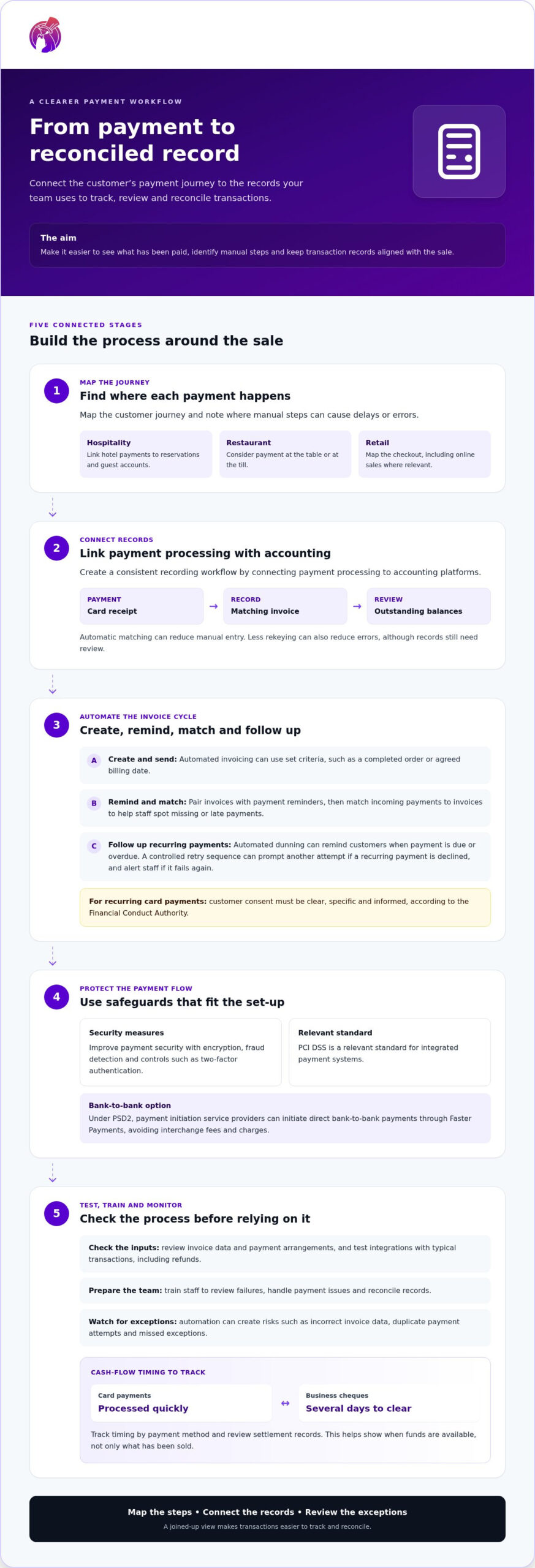
To streamline business payments, connect payment processing with accounting platforms so transactions follow a consistent recording workflow. For example, automatically matching a card receipt to its invoice reduces manual entry and gives finance teams a clearer view of outstanding balances. Less rekeying can also reduce errors, although records still need review.
Automated invoicing can create and send invoices based on set criteria, such as a completed order or agreed billing date. Pair it with payment reminders, then match incoming payments to invoices automatically. This makes reconciliation easier and helps staff spot missing or late payments without searching through separate records.
Automated dunning sends customers reminders when payment is due or overdue. If a recurring payment is declined, a controlled retry sequence can prompt another attempt and alert staff if it fails again. For recurring or bulk payments, check that the payment method and arrangements suit your business and customers.
For recurring card payments, the Financial Conduct Authority says customer consent must be clear, specific and informed. Under PSD2, payment initiation service providers can initiate direct bank-to-bank payments through Faster Payments, avoiding interchange fees and charges.
Improve payment security with encryption, fraud detection and controls such as two-factor authentication. PCI DSS is a relevant standard for integrated payment systems. Automation can still create risks, including incorrect invoice data, duplicate payment attempts and missed exceptions. To streamline the process, map each payment step, check the data, test integrations and train staff to review failures and reconcile records.
2. Why does payment processing affect cash flow so much?
Cash flow depends not only on sales but also on when payments clear and appear in business accounts. Card payments are widely accepted and processed quickly, while business cheques can take several days to clear. The difference affects how readily a business can use incoming funds for stock, wages and other operating needs. Track timing by payment method to see where delays arise.
Make checkout straightforward by offering methods customers are comfortable using, such as contactless cards, mobile wallets or bank transfers. In a restaurant, tableside payment lets guests settle their bill without waiting for a till. A simpler checkout can reduce friction and give staff more time for other tasks.
Set expectations before customers pay. Clearly explain accepted methods, payment terms, refund policies and any applicable fees on invoices, menus or checkout screens. For example, online customers should see their payment options before confirming an order. Clear information helps manage expectations and reduce misunderstandings that can lead to disputes or late payment.
Receipts link the customer experience to accurate accounts. Offer an electronic receipt after a card or mobile payment, and make sure the transaction record matches the sale. Reviewing records helps staff identify refunds, missing payments and discrepancies. For credit sales, state when payment is due and monitor outstanding invoices, so expected income is distinct from funds already received.
Assess the impact by comparing checkout delays, payment issues and settlement timing across sales channels. A joined-up view of transactions can show which methods support smoother service and more predictable cash flow. Use what you learn to refine the options you present to customers.
3. Hospitality and retail payment needs
A hospitality or retail payment system should fit the way each sale takes place. A hotel, for example, can link payments to reservations and guest accounts, helping staff match a charge to the right stay. A restaurant may need to take payment at the table or till, while a retailer needs a checkout process that keeps queues moving. Map these customer journeys to find where manual steps cause delays or errors.
For hospitality businesses, the practical challenge is managing payments alongside service. Staff should know how to process transactions, explain available options and handle payment issues calmly. A consistent process across reception, restaurant and other sales points can make payments more seamless. Clear transaction records also help teams match charges to bookings and resolve guest queries.
Retailers can improve convenience after the sale as well as at checkout. Digital receipts reduce paper and give customers a transaction record that can help with returns. Gift card programmes can attract new customers, encourage repeat business and offer another way to pay. Review sales and redemption records to understand how these options fit your operations.
At physical sites, integrating the point-of-sale system with payment processing can reduce duplicated steps between recording a sale and taking payment. Before changing your set-up, identify the payment methods customers use, the records staff need and where errors occur. Test typical transactions, including refunds, and train employees on the process. This preparation supports customer satisfaction without making checkout harder for staff.
PenguinPay: Fully Integrated EPOS systems
PenguinPay offers Fully Integrated EPOS systems for hospitality and retail businesses that want to bring sales and payment processes together. If staff handle transactions across separate systems, an integrated EPOS set-up may be a practical next step. PenguinPay also offers Face-to-Face Card Payments for in-person sales, Business Banking and E-commerce gateways for online payments.
The right combination depends on how your business serves customers, where transactions happen and how you need to review them. A retailer taking payments in-store and online, for example, may need both face-to-face and e-commerce payment channels. A hospitality business can assess how its EPOS and payment arrangements fit the customer journey, from ordering to settlement.
Contact PenguinPay to discuss payment solutions for your business.
Make your next payment decision with confidence
Start by mapping how a customer’s payment moves from sale to record, then identify where your team still relies on manual work. This gives you a practical basis for deciding what to improve first, rather than changing systems without a clear operational need. A measured plan to streamline business payments should reflect your sales channels, staff workflows and cash-flow records.
PenguinPay offers Fully Integrated EPOS systems, Face-to-Face Card Payments and Business Banking. These options may suit businesses reviewing how in-person payments and related operations fit together. For guidance on payment options for your business, contact PenguinPay to discuss your requirements. A well-considered next step can help you build a payment process that supports your day-to-day work.
Frequently Asked Questions
Why does streamlining your payment processing matter?
Clear payment controls establish who can approve, amend or refund transactions. For example, a business can assign payment tasks by staff role and require a manager to review unusual refunds. Defined responsibilities reduce reliance on informal handovers and help staff handle exceptions without delaying routine customer transactions.
Why is integrated payment processing better than standalone systems?
A joined-up workflow can make everyday sales and payment tasks easier to learn and repeat. Assess the set-up by walking staff through common exceptions, such as a split bill or part-refund. If they can complete each process without confusion about which system or step comes next, the workflow is easier to operate consistently.
How does a POS system help simplify transactions and improve cash flow?
A POS system can help staff calculate the amount due and take payment within the same checkout process. To assess its practical value, test a typical sale, split payment and refund before relying on it during busy service. Handling these cases smoothly can prevent avoidable checkout interruptions and missed or delayed sales.
What are the most common mistakes businesses make when handling customer payments?
Common errors include choosing the wrong tender type, retrying a payment before checking its status, or taking payment against an unconfirmed order. If a terminal responds slowly, staff should follow a clear procedure to establish whether the first attempt succeeded before trying again. This helps avoid duplicate charges and the customer queries they cause.
What tools can help reduce late payments and automate payment reminders?
A self-service payment portal can let customers choose a payment method and manage recurring billing options. For example, a business could link to the portal from an invoice, giving customers a clear way to pay without calling staff for instructions. Make the due date and available options easy to find, then review whether customers complete payment through the portal.