
Article by
Chris Niblett
With over 28 years of experience in IT and pre-sales roles, my transition into the hospitality and retail sectors has enabled me to help businesses of all sizes optimise their electronic payments and EPOS systems. My passion for service-driven solutions led me to create PenguinPay, where I provide tailored solutions that drive business success.
The best EPOS for restaurants in the UK is the system that fits how your venue takes orders and serves guests, not simply the one with the longest feature list. Flexible menu modifiers, course timing and clear kitchen communication matter differently in a café, pub, takeaway or full-service restaurant.
Choosing an EPOS is a practical decision: the right setup should support your service style without adding unnecessary complexity. This guide explains which capabilities to prioritise, how ordering features work during service and how requirements vary by venue type. You’ll be better placed to compare systems for everything from quick counter service to table management, tabs and courses, and to identify which features will make a real difference to your restaurant.
Key Takeaways
- Choose an EPOS around the way your restaurant takes orders, serves customers and manages its day-to-day operations.
- Assess how delivery, reservation and accounting integrations could support smoother workflows across your business.
- Look for flexible menu modifiers, course timing and kitchen communication that match the pace and style of your service.
- Prioritise the features your venue type needs, from quick counter ordering in a café to tabs and bill-splitting in a pub.
What is the best hospitality EPOS system?
The right system connects orders, payments and back-office workflows. Compare integrations by the tasks they simplify.
Delivery, reservation and accounting integrations
Delivery-platform links can send orders into the EPOS, while reservation integrations connect bookings with table planning. Accounting links transfer sales data for reconciliation and reporting. Each supports a different hand-off: delivery brings in orders, reservations help organise arrivals, and accounting supports work after service. Prioritise the connections that match your restaurant’s busiest workflows.
Online ordering and third-party integrations
Online ordering lets customers place orders digitally, while third-party integrations connect the EPOS with tools such as loyalty or payroll services. The key difference is the order channel: delivery integrations receive marketplace orders, whereas online ordering can provide a direct route. Accounting and payroll connections move business records, so smooth data transfer can reduce duplicate entry.
Support, offline reliability and data security
An integrated system should pass orders from the counter or online checkout to the kitchen display, then record each transaction consistently. Check how it behaves during an internet outage, including whether it can continue processing locally and sync when service returns. Compare setup and support for service disruptions, as well as data-access controls. Card-payment handling must meet PCI DSS card security standards.
Payment, VAT and receipt requirements
HM Revenue & Customs expects VAT-registered businesses to keep digital VAT records under Making Tax Digital. An EPOS that exports takings to accounting software can support VAT-return preparation. Card payments must meet PCI DSS card security standards. Clear, itemised receipts help customers understand transactions, while staff should be able to correct an order before payment is completed.
| Option | Main role | Distinguishing criterion |
|---|---|---|
| Delivery and reservations | Orders and bookings | Service flow |
| Online and third-party links | Digital orders and tools | Connected channels |
| Accounting integration | Sales records | Back-office workflow |
Choose integrations around your busiest operational hand-offs.
Flexible ordering, modifiers and course timing
For table management, menu flexibility and kitchen displays, prioritise an EPOS system that links each order to its table and preparation stage. The configuration should also support your menu and online-ordering workflow.
Order customisation and course timing
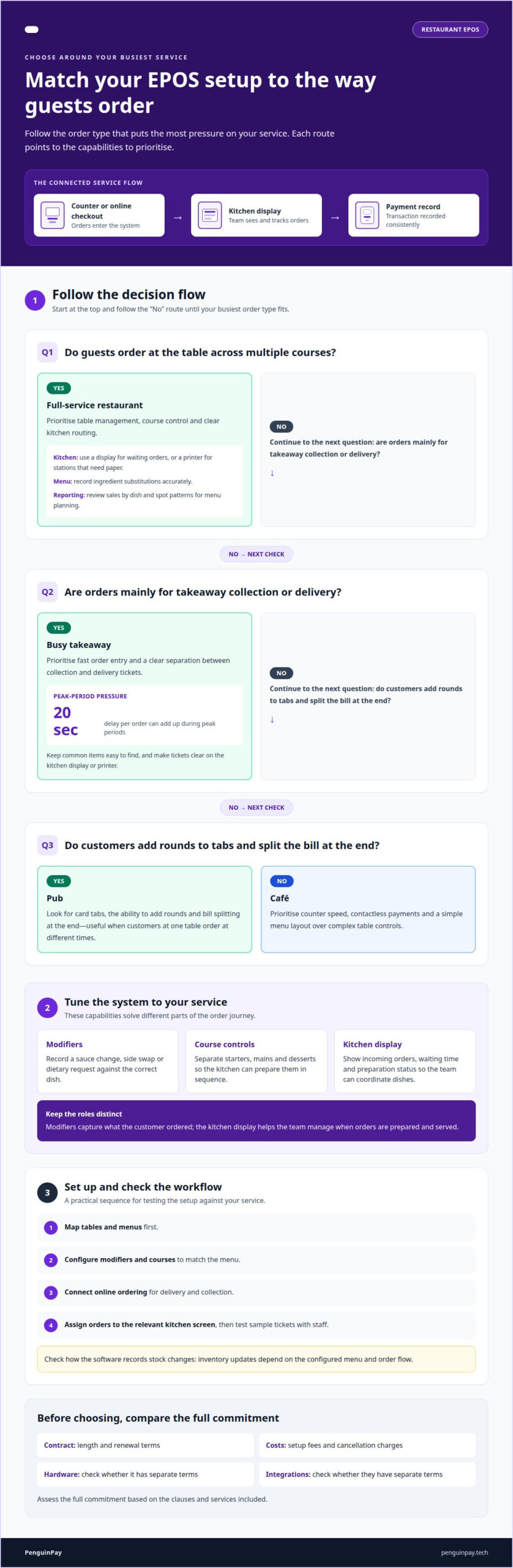
Modifiers let staff record choices such as a sauce change, side swap or dietary request against the correct dish. Course controls separate starters, mains and desserts, so the kitchen can prepare them in sequence rather than receiving one undifferentiated ticket. Table management connects each order to its table and guests. Together, these tools support dine-in service beyond straightforward counter ordering.
Before choosing, compare contract length, renewal terms, setup fees and cancellation charges. Check whether hardware and integrations have separate terms, and assess the full commitment based on the clauses and services included.
Kitchen displays and order management
A kitchen display screen presents incoming orders and can show how long each has been waiting. Staff can track preparation status on-screen, helping the kitchen coordinate dishes and spot tickets needing attention. This is different from menu modifiers: modifiers capture what the customer ordered, while the display helps the team manage when orders are prepared and served.
To set up an EPOS system, map tables and menus first, then configure modifiers and courses. Connect online ordering for delivery and collection, assign orders to the relevant kitchen screen, and test sample tickets with staff. Check how the POS software records stock changes, as inventory updates depend on the configured menu and order flow. Testing these steps helps you assess EPOS systems against your actual service needs.
EPOS requirements by restaurant type
The best setup depends on where service slows down. Match the terminal, software and kitchen workflow to the venue’s busiest order type.
For a full-service restaurant, prioritise table management, course control and clear kitchen routing. A kitchen display system can show waiting orders, while a printer can produce tickets for stations that need paper. Ingredient-level menu choices help staff record substitutions accurately. Reporting should make it easier to review sales by dish and spot patterns for menu planning.
A busy takeaway needs fast order entry and a clear separation between collection and delivery tickets. A delay of 20 seconds per order can add up during peak periods. Choose a layout that keeps common items easy to find, and make sure the kitchen display or printer presents each order clearly. This differs from table service, where course timing and table assignment matter more.
For a pub, look for card tabs, the ability to add rounds and bill splitting at the end. These functions suit customers ordering at different times at one table. A café should prioritise counter speed, contactless payments and a simple menu layout over complex table controls.
Compare options against your busiest service scenario: a lunch queue, a full dining room or a crowded bar. That reveals whether menu navigation, reporting or kitchen communication deserves priority. Discuss an EPOS setup for your restaurant to explore a configuration suited to your service style.
For a full-service restaurant, look for an EPOS setup that combines table assignment and course control with kitchen routing to a display screen. Menu options should also let staff record ingredient substitutions accurately.
PenguinPay: Fully Integrated EPOS systems
PenguinPay provides Fully Integrated EPOS systems for restaurants seeking a connected approach to orders and payments. These can suit venues reviewing how front-of-house transactions fit into wider business operations, whether service centres on tables, a counter or takeaway orders.
Alongside EPOS, PenguinPay provides Face-to-Face Card Payments, Business Banking and E-commerce gateways. These services address different parts of a restaurant’s payment and business setup, from in-person transactions to online sales. The right combination depends on the channels your restaurant uses and the operational needs you’ve identified.
If you’re considering a change to your restaurant’s EPOS or payment setup, contact PenguinPay to discuss your requirements.
Plan your next step with confidence
Choosing the best EPOS for restaurants in the UK is also an opportunity to plan for changes in your service. Consider whether your ordering channels, menu and team responsibilities are likely to evolve, then use those priorities to shape a system that supports your operation over time. A clear picture of your requirements makes the next discussion more focused, from day-to-day order flow to the wider payment setup.
PenguinPay offers Fully Integrated EPOS systems, Face-to-Face Card Payments and Business Banking. If you’re ready to discuss how your restaurant’s requirements fit together, contact PenguinPay about restaurant EPOS. A thoughtful next step can help you move towards a setup that feels right for your venue.
Frequently Asked Questions
Can one system run my till, kiosks and card payments together?
One EPOS setup can coordinate a till, kiosks and card payments when configured to support each channel. For example, kiosk orders can feed into the same sales workflow as counter orders, giving staff a single place to manage them. PenguinPay supports businesses across London, Greater London, Nottingham, Leicester, Chesterfield, Derby, Lincoln, Grantham, Derbyshire, Nottinghamshire, Leicestershire, Lincolnshire and Staffordshire.
Do I need a kitchen display screen, or will a printer do?
Choose based on how kitchen staff receive and manage tickets. A printer produces paper dockets for stations where cooks prefer physical tickets; a display shows orders on screen for teams managing a visible queue. Consider the kitchen layout, ticket routing and staff preferences. Using both can serve different stations when the EPOS configuration supports that workflow.
What are the best EPOS systems for restaurants in the UK in 2026?
There is no single best system for every UK restaurant in 2026. Compare options against your service format, required integrations, order channels and reporting needs. A café prioritising counter speed has different requirements from a full-service venue managing table orders. PenguinPay offers Fully Integrated EPOS systems, giving restaurants a route to discuss an EPOS setup suited to their operational requirements.
How much do UK restaurant EPOS systems cost, including hardware, software and transaction fees?
Costs depend on the setup and are discussed as part of a tailored proposal. Consider the number of terminals, hardware, software subscriptions, transaction charges and any paid integrations when assessing the overall cost. Compare the full setup against your restaurant’s sales channels and operating requirements, rather than focusing only on the till’s headline cost. PenguinPay provides EPOS and payment solutions tailored to the requirements discussed.
Which restaurant EPOS systems integrate with UK accounting, payroll, delivery and payment platforms?
Integration availability depends on the EPOS system and its connections to each third-party platform. Start by identifying the accounting, payroll, delivery and payment tools your restaurant relies on, then compare how orders and records pass between them. PenguinPay provides Fully Integrated EPOS systems and tailored EPOS and payment solutions to businesses across the UK, including London and the Midlands.