
Article by
Chris Niblett
With over 28 years of experience in IT and pre-sales roles, my transition into the hospitality and retail sectors has enabled me to help businesses of all sizes optimise their electronic payments and EPOS systems. My passion for service-driven solutions led me to create PenguinPay, where I provide tailored solutions that drive business success.
A till doesn’t have to be tied to a dedicated machine. Cloud EPOS is a point-of-sale system that stores business information remotely and makes it accessible through a web browser on an internet-connected device. It can connect sales and payment records with stock, accounting and loyalty tools, giving teams a more joined-up view of daily operations.
It’s reasonable to expect a modern till to do more than take payments, but how its connections work may be less obvious. This guide explains how browser-based EPOS works, what it can bring together and what to consider when choosing a system for a UK business. It also covers the role of internet access and how an integrated EPOS solution can support connected operations.
Key Takeaways
- See how browser access can make sales, stock and customer records available across internet-connected devices.
- Learn which connections can help bring payments, inventory, accounting and loyalty activity into a more joined-up workflow.
- Consider how internet reliability affects daily transactions and what this means for your business operations.
- Find out when a fully integrated EPOS system from PenguinPay may suit a business seeking connected payment processes.
Integrating payments, stock, accounting and loyalty
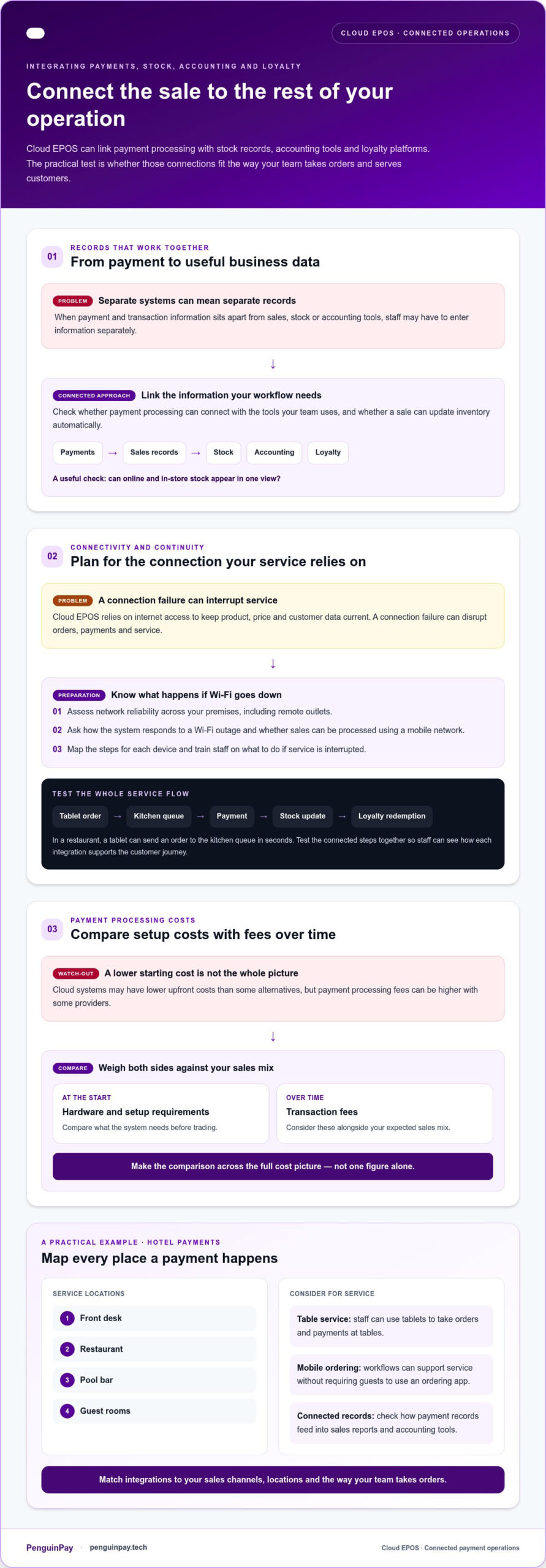
A cloud EPOS system can connect payment processing with stock records, accounting tools and loyalty platforms. Look for integrations that match your sales channels and the way your team takes orders.
For example, can a sale update inventory automatically and bring online and in-store stock into one view? Check these practical capabilities against your day-to-day needs before choosing a system.
Payment processing costs
Cloud systems may have lower upfront costs than some alternatives, but payment processing fees can be higher with some providers. Compare hardware and setup requirements with transaction fees over time, taking your expected sales mix into account.
For a hotel, map payments across the front desk, restaurant, pool bar and guest rooms. Staff can use tablets to take orders and payments at tables, while mobile ordering workflows can support service without requiring guests to use an ordering app.
Check how payment records feed into sales reports and accounting tools. When payment and transaction data flow between connected systems, staff may need to enter less information separately.
Connectivity and payment continuity
Cloud EPOS relies on internet access to keep product, price and customer data current. A connection failure can disrupt orders, payments and service, so assess network reliability across your premises, including remote hotel outlets.
Ask how the system responds to a Wi-Fi outage and whether your business can switch to its mobile network to process sales. Map the steps for each device and train staff on what to do if service is interrupted.
In a restaurant, a tablet can send an order to the kitchen queue in seconds. Test that workflow alongside payment processing, stock updates and loyalty redemption, so staff can see how each integration supports the customer journey.
What is a Cloud-based POS System?
A cloud-based POS stores information on a remote network and makes it available through internet-connected devices. There’s no single best UK system: compare access, reporting and hardware with the way your business operates.
Remote sales and transaction reporting
A restaurant manager can use a mobile device to view sales, transaction history and best-selling items remotely. Real-time reports can show sales figures and customer traffic patterns, helping managers review trading away from the till. Compare reporting options by the decisions they support, such as identifying popular retail products or reviewing performance across locations. Cloud EPOS data can synchronise across devices.
Mobile and desktop access
Cloud systems can run on internet-connected tablets, smartphones and laptops, rather than only on dedicated till hardware. For mobile trading, a tablet can serve as the front end for orders or payments. To migrate, map products and prices, prepare existing records for transfer, configure the new system and test transactions before switching over. This helps identify missing product details before live trading.
Cloud and traditional till systems
Cloud systems provide remote access to sales and inventory data. Traditional EPOS, which runs locally on dedicated hardware, can be more stable in high-volume environments. The right choice depends on trading conditions: weigh the value of remote reporting and access across devices against reliance on internet connectivity. A busy venue with demanding service may prioritise local stability, while a business with multiple locations may value central access.
Security and UK data protection
Cloud hosting alone doesn’t establish that a system is secure or meets UK data protection obligations. Before adopting one, assess how customer data is stored, who can access it, how backups work and what the provider documents about data handling. Cloud POS data may be backed up and synchronised automatically, but businesses still need to understand their own access controls and information-management practices.
Browser-based cloud EPOS
Browser access means reaching the point of sale as an electronic service through an internet connection. The key distinction is access to central data, not the shape of the till.
Browser-based system access
A browser-based system lets authorised staff access cloud EPOS from an internet-connected device, rather than relying on software installed on one till. Updates are managed centrally, avoiding local update tasks. In hospitality, a manager can review reports remotely while staff use the point of sale at service locations. Before choosing, map where teams need access and which information each role must see.
Cloud EPOS hardware requirements
A smartphone, tablet, laptop or other internet-enabled device can provide the front end, so dedicated till hardware isn’t always required. The practical setup depends on the work: a tablet may suit taking orders, while a laptop can support back-office reporting. List the devices needed at each location, then match them to how staff serve customers and process payments.
For a business with several locations, cloud EPOS can give managers central access to reports and business data from anywhere with an internet connection. A hospitality team might use a tablet on the floor and a desktop in the office, with both accessing the same system. Device choice is therefore a workflow decision, not simply a hardware purchase.
To assess a browser-based setup, map your locations, devices and reporting needs before selecting a system. Then consider how an integrated EPOS arrangement could meet those requirements.
PenguinPay: Fully Integrated EPOS systems
PenguinPay provides Fully Integrated EPOS systems for businesses looking to connect in-person payments with point-of-sale operations. It could be a relevant next step if your current setup separates payment activity from sales processes, or you’re assessing how a system could support multiple trading channels.
PenguinPay also provides Face-to-Face Card Payments and E-commerce gateways. Consider which channels your business uses, how staff take payments and what information needs to flow between them. These requirements can guide a discussion about an EPOS arrangement suited to your operation, without assuming every business needs the same configuration.
To discuss your EPOS and payment requirements, contact PenguinPay.
Plan your next EPOS step
Start by mapping how your team handles payments across sales channels, then identify where hand-offs need a more connected workflow. Before choosing a cloud EPOS system, note how till activity, financial records and customer engagement intersect. This gives you a practical basis for assessing whether a setup suits your operation as it develops. Prioritise the tasks that matter most to staff and customers instead of selecting features without a clear purpose.
PenguinPay offers Fully Integrated EPOS systems, Face-to-Face Card Payments and Business Banking. If you’re considering how these could fit your business requirements, contact PenguinPay to discuss cloud EPOS and your next steps.
A considered plan helps you move forward with clarity and confidence.
Frequently Asked Questions
What is an EPOS System?
An EPOS system is an electronic point of sale that records purchases and supports payment processing. For example, a Leicester retailer can enter each item at the till, apply the correct price and keep a transaction record. Depending on its integrations, the system may also connect sales with stock or accounting tools, helping staff avoid entering the same information in separate places.
What is a cloud EPOS system?
A cloud EPOS system stores business information remotely and lets authorised users access it through connected devices. A manager overseeing a shop in Nottingham can review trading information from another location instead of relying solely on the till. Access and available functions depend on the system setup, so consider which staff need which information during a normal shift.
How does cloud EPOS software work?
Cloud EPOS software records transactions and synchronises relevant data across connected devices. A sale entered at a till, for instance, can appear in system reports, while an integration may pass sales information to accounting software. This can reduce duplicate data entry. Available connections depend on the platforms a business uses and how the system is configured.
How much does cloud EPOS cost in the UK?
The cost of cloud EPOS depends on the setup, including terminals, hardware, software features and integrations. Ongoing payment processing fees also affect the overall cost, so assess them alongside initial requirements. Consider the sales channels and functions your team needs before comparing proposals. The price depends on the case and is given after a quote request.
Can cloud EPOS work offline if the internet goes down?
Cloud EPOS relies on internet access to keep product, price and customer data current, so an outage can affect orders, payments and service. Offline transaction handling depends on the system. If Wi-Fi fails, a business may be able to switch to its mobile network to process sales. Plan how staff will manage interruptions before they happen.