
Article by
Chris Niblett
With over 28 years of experience in IT and pre-sales roles, my transition into the hospitality and retail sectors has enabled me to help businesses of all sizes optimise their electronic payments and EPOS systems. My passion for service-driven solutions led me to create PenguinPay, where I provide tailored solutions that drive business success.
The switch itself can be quicker than the planning behind it. For a UK single-site retailer, an EPOS upgrade involving new hardware, software configuration and staff training typically takes one to three days. An EPOS migration specialist reviews the data, applications and integrations first, then sets a realistic plan.
It’s understandable to focus on keeping tills working and sales records intact during a change. Identify compatibility issues early, protect and test the data transfer, and plan staff access before the new system goes live. This guide explains how to assess migration options, review application compatibility, and use backups, test imports and access to the previous system to support a controlled switch.
Key Takeaways
- Choose a migration approach after reviewing hardware age, support, performance and the needs of each site.
- Protect useful sales history and plan a test import before the new system becomes the live record.
- Map how EPOS connects with payments, stock, accounting and other applications to surface compatibility risks early.
- Plan staff access and a read-only fallback for the old system so the transition remains manageable after launch.
How an EPOS migration specialist manages data backups, test imports and post-migration access
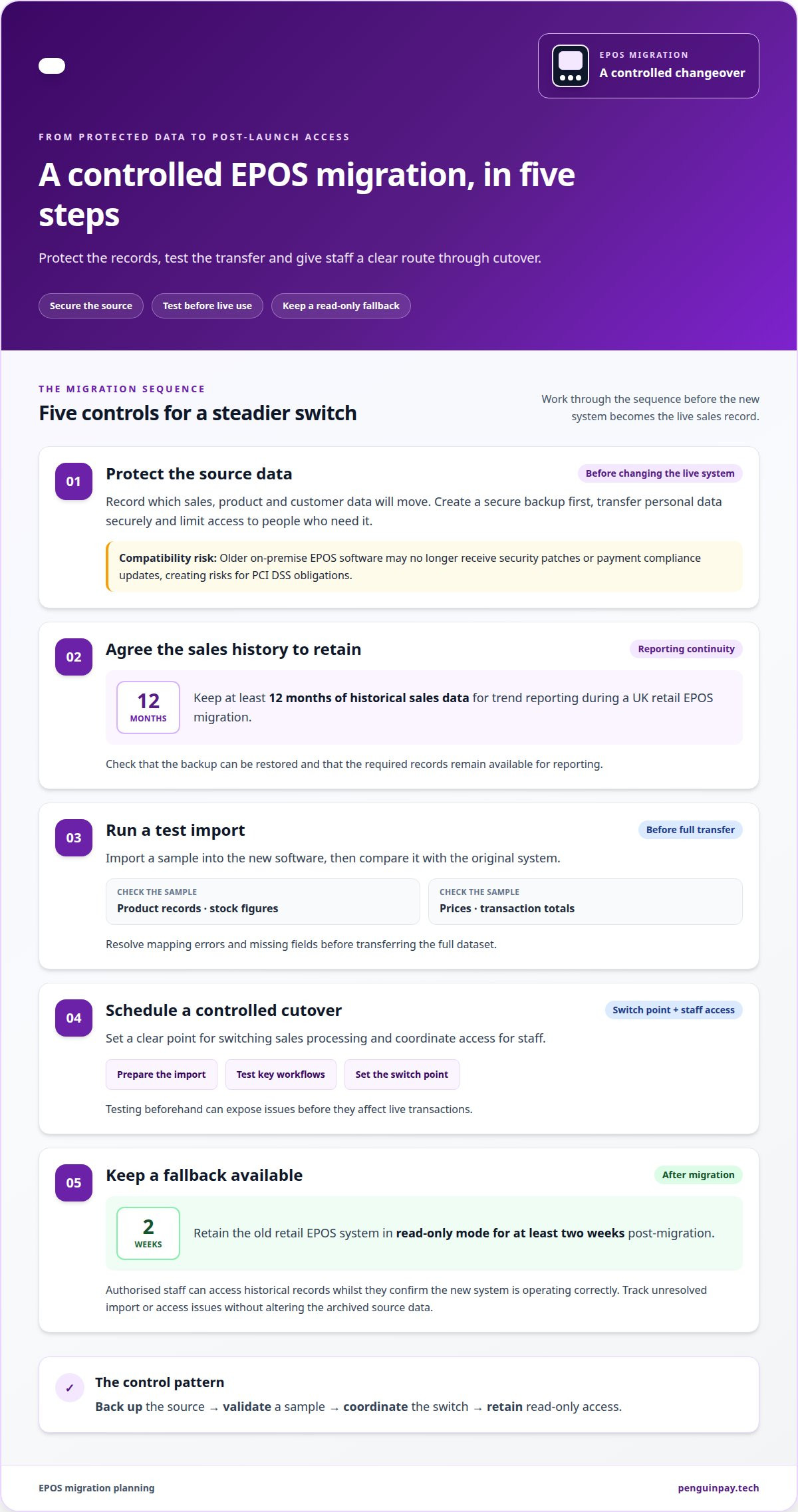
A controlled transfer protects sales history and gives staff a clear process for cutover. The work centres on five steps, from securing source data to retaining read-only access after launch.
- Protect the source data. Record which sales, product and customer data will move, then create a secure backup before changing the live system. For UK migrations, transfer personal data securely and limit access to people who need it. Older on-premise EPOS software may no longer receive security patches and payment compliance updates, creating risks for PCI DSS obligations.
- Agree the history to retain. Keep at least 12 months of historical sales data for trend reporting during a UK retail EPOS migration. The specialist checks that the backup can be restored and that the required records remain available for reporting.
- Run a test import. Before live cutover, import a sample into the new software. Compare product records, stock figures, prices and transaction totals with the original system. Resolve mapping errors and missing fields before transferring the full dataset.
- Schedule a controlled cutover. The specialist sets a clear point for switching sales processing and coordinates access for staff. Preparing the import and testing key workflows beforehand helps limit disruption; a test can expose issues before they affect live transactions.
- Keep a fallback available. Retain the old retail EPOS system in read-only mode for at least two weeks post-migration. This gives authorised staff access to historical records whilst they confirm the new system is operating correctly. The specialist tracks unresolved import or access issues and addresses them without altering the archived source data.
Assessment of migration options
Compare migration routes based on hardware condition, support needs, integrations and the retailer’s growth plans.
-
Compare specialist and in-house migration
Compare in-house migration with specialist support by mapping who will manage the data, EPOS configuration and connected systems. An internal team may know existing workflows, but also needs the capacity to coordinate the change. A specialist can provide migration experience and structured oversight. A retailer with several tills and accounting or stock integrations, for example, has different coordination needs from a single-till business.
-
Check a specialist before choosing
Assess the proposed approach, not just a provider’s general experience. Look for a clear inventory of devices, locations, equipment age, support arrangements, network needs and software requirements. Ask how the assessment will cover terminal performance, warranty, operating-system support and peripherals. The plan should also consider integrations, security, staff experience, growth and upcoming costs, so important dependencies are not overlooked.
- Match the migration route to the equipment. A software-only EPOS upgrade is best suited to UK retailers whose hardware is under three years old. Older terminals, unsupported operating systems or unreliable peripherals may make hardware replacement part of the wider migration decision.
- Review the system’s role across the business. Record how the EPOS supports daily sales, reporting and connected processes, then identify where disruption would have the greatest effect. This helps prioritise the systems and workflows that need attention during planning.
- Set the scope around current needs and future changes. A single-site retailer adding locations or new integrations should weigh those plans alongside present performance. Discuss your EPOS migration requirements to shape a considered assessment.
Concerns about application compatibility
- Map every connection. Record which applications exchange information with the EPOS, including accounting, stock, payments, booking, loyalty, online ordering and reporting systems. A sale may, for example, update stock and feed figures into accounting. This map shows which links need testing and where a break could affect daily operations.
- Define support responsibilities. An IT provider doesn’t necessarily support EPOS software, so clarify who manages each application and connection. Identify the EPOS supplier, internal IT team and application contacts in the migration plan, then assign responsibility for configuration, testing and fault resolution. Clear ownership helps prevent issues being passed between teams.
- Check how data moves. Compare the information each connected application sends and receives. Product codes, transaction totals and stock updates need consistent meanings across systems. A test sale can show whether a payment record reaches reporting correctly or a stock change appears in the inventory system.
- Review access and security dependencies. Include user and administrator permissions, device and network security, remote access, third-party support access and software updates in the compatibility review. An external support connection, for example, may need a defined owner and access scope. This helps identify security requirements that could otherwise disrupt connected services during migration.
- Test complete workflows before launch. Validate a representative transaction from sale through payment, stock adjustment and reporting. Record failed connections, missing fields and delayed updates, then resolve them before the new EPOS becomes operational. To discuss how connected applications fit your EPOS plans, talk through your migration requirements.
PenguinPay: Fully Integrated EPOS systems
PenguinPay provides Fully Integrated EPOS systems for businesses assessing a retail system change. Once you’ve mapped your requirements, this is a practical next step for considering how EPOS can support your sales operations. The right setup depends on your workflows, connected applications and how customers pay.
PenguinPay also provides Face-to-Face Card Payments and E-commerce gateways. These may suit businesses taking payments in-store and online. Considering payment options alongside EPOS can help define the requirements for a connected setup, without assuming every business needs the same configuration.
If you’re reviewing your retail EPOS options, contact PenguinPay to discuss your requirements.
Plan your next EPOS decision with confidence
Use your migration findings to define what the new setup must support, from daily sales processes to how customers pay. An EPOS migration specialist can help clarify the technical requirements as you decide which services fit your wider operations.
PenguinPay provides Fully Integrated EPOS systems, Face-to-Face Card Payments and Business Banking. These may be relevant as you consider how in-store transactions and business finances fit your plans. The right priorities depend on your trading model and the systems your team relies on.
When you’re ready to discuss the next step, contact PenguinPay to discuss your EPOS requirements. A clear conversation can help you move from migration planning towards a setup that suits your business. Your next EPOS decision can start with a considered plan.
Frequently Asked Questions
How long does it take to switch to a new EPOS system in a retail shop?
A UK single-site retail EPOS upgrade involving new hardware, software configuration and staff training typically takes one to three days. This estimate covers the upgrade work, not all the planning beforehand. The schedule also depends on the number of tills, the condition of existing equipment and whether connected payment or stock processes need configuring.
Will I lose my product data and sales history when I upgrade my till system?
Product data and sales history can be transferred when the source system makes them accessible and the new EPOS accepts their format. Before cutover, confirm that key fields such as product codes, descriptions and prices appear correctly in the destination system. A missing product code, for example, can affect stock records and transaction reporting after launch.
What does an EPOS migration specialist do?
An EPOS migration specialist coordinates the technical and operational work involved in moving to a new till system. This includes reviewing equipment and applications, identifying data and integration dependencies, and organising migration tests. They can also clarify which team manages each connection, such as the link between EPOS, accounting software and card payments.
What information and data can be migrated between EPOS systems?
Common data categories include product details, prices, stock records, sales history and customer information. The fields that can be used depend on how the existing EPOS stores and exports records, and how the new system organises them. For example, a product catalogue may need its codes and descriptions mapped to matching fields so sales and inventory records remain meaningful.
How long does an EPOS migration typically take?
The full migration timeline includes preparation as well as the changeover, so it can extend beyond the on-site upgrade. Data volume, the number of locations, application connections and time spent resolving test issues all affect the schedule. Retailers in Nottingham, Leicester and elsewhere in the Midlands can plan around trading patterns and staff availability to reduce operational disruption.